CSS Cheat Sheet
1/1/1970
Basics
Cascading Style Sheet(CSS): it is used to define styles for your web pages, including the design, layout and variations in display for different devices and screen sizes.
Syntax:
selector { property1:value1; property2: value2; ...}
/* selector Declaration Declaration*/
h1 {color:blue; font-size:12px;}
/* ^ ^ ^ ^
property value property value
*/Selector Types:
- element Selector :
<p>tag ->pselector - id Selector :
id=para->#para1selector - class Selector:
class-"center"->.centerselector - Universal Selector :
*Select all elements
Combinations of Selectors:
- class Selector for specific element :
<p>&class="center"->p.center {...} - grouping selector :
p, #para, .center {...}
Note:
- HTML elements can refer to more than one class ex:
<p class="center large"></p>: styled according to two classcenter&large - A class name cannot start with a number
Three Ways to Insert CSS
- External CSS
<head>
<link rel="stylesheet" href="style.css">
</head>/*style.css*/
body { background-color: lightblue;}
h1 { color: navy; margin-left: 20px;}- Internal CSS
<head>
<style>
body { background-color: lightblue;}
h1 { color: navy; margin-left: 20px;}
</style>
</head>- Inline CSS
<h1 style="color:blue;text-align:center;">Title</h1>
<p style="color:red;">This is a paragraph.</p>Note:
- Do not add a space between the property
valueand theunit20 px❌20px✅ - All the styles in a page will "cascade" into a new "virtual" style sheet by the following Priority rules
Inline > External/Internal > Browser default - A
external/Internalstyle defined after otherinternal/externalthe last read style sheet will be used.
Comments
You can use comment inside /**/ anywhere in CSS Style region
p { color: /*this is a
multiple line
comment*/ blue; }Properties
CSS Color:
Properties : Text Color (color) , Background Color, Border Color
Value Types : color names, or RGB, HEX, HSL, RGBA, HSLA values.
{
color, background-color, border-color :
/* Using Color Name*/
Red, Green, Blue, Yellow, Orange, gray
LightGray, darkgreen DarkGreen, Tomato DodgerBlue,
MediumSeaGreen, SlateBlue,
/* Using RGB Values */ rgb(255, 99, 71)
/* Using HEX Values */ #ff6347,
/* Using HSL Values */ hsl(9, 100%, 64%),
/* Using RGBA Values */ rgba(255, 99, 71, 0.5)
/* Using HSLA Values */ hsla(9, 100%, 64%, 0.5);
}
/* Note: This is for learning purposes, commas are not used in this way */RGB Color Concept:
- Red + Green + Blue
RGB(0,0,0)-> BlackRGB(225, 225, 225)-> White- If 0<
R=G=B<225 -> Gray shades - RGBA -> Alpha(
A) for transparency ->0-> fully transparent1no transparency
HSL Color Concept:
- HUE + Saturation + Lightness
- HUE: Degree on the color wheel (0 to 360)-> red (0), green(120), blue(240)
- Saturation: Percentage of color (0 to 100) -> shade of gray(0%), full color (100%)
- Lightness: Percentage of light (0 to 100) -> white (0%), black(100%)
- HSLA -> Alpha(
A) for transparency ->0-> fully transparent1no transparency
HEX Color Concept:
#rrggbb->rr(Red) +gg(Green) +bb(Blue)- Each Digit ->
0.....9,a, .....f #000000-> Black#ffffff-> White- 3-digit hex shorthand :
#fc9->#ffcc99
Note:
- Use commas to separate
multiple selectorsormultiple valuesin shorthand properties, but **do not use commas when specifying a single color value for properties likecolor,background-color, etc. - Semicolons (
;) are used toseparate CSS declarationswithin a rule set and to terminate the last declaration - CSS is not case-sensitive for most parts, including
selectors (dIv),property (coLor), andvalues (rEd), except in specific cases.class,#idare case-sensitive- URLs, custom strings, or when working with XML namespaces.
- Content like
font-familyorcontent: "Text"can be case-sensitive depending on the specific use.
CSS Opacity:
Opacity property Add transparency to the element like Background, text, images, and all of its child elements inherit the same transparency.
{
opacity:
0.3 , 0 /* 0 to 1*/
}CSS Background
Background Color:
{ background-color: lightblue, red, #f00000, rgba(255,0,0) #abc, green; }Background Image Properties:
{
background-image:
url("paper.gif"), url("gradient_bg.png");
background-repeat: /* repeats an image */
repeat-x, no-repeat, repeat-y;
background-attachment: /*background image scroll/fixed */
fixed, scroll;
background-position: /* position an image */
right top, down left;Background Shorthand:
{ background: #ffffff url("img_tree.png") no-repeat right top; }
/* Order: color > image > repeat > attachment > position */More Background Properties
{
background-blend-mode
background-clip
background-size
background-origin
background-position
background-position-x
background-position-y
}Shorthand Notes:
- In It does not matter if one of the property values is missing, as long as the other ones are in this order.
- For short hand property, In some cases order is not strict, however it can lead to inconsistent results across different browsers or CSS parsers
- In shorthand, If units/value are of different type browser can deduce that
solidis the style,Tomatois the color, and2pxis the width.
CSS Border
Border Specific Properties
{
border-style :
dotted, dashed, solid, double, groove, ridge, inset, outset, none, hidden,
dotted solid double; /* dotted top, solid left-right, double bottom*/
border-width :
5px, 2cm, 2pt, 2em, medium, thick, /*top-bottom-left-right*/
5px 20px, /* 5px top-bottom, 20px left-right */
25px 10px 4px 35px; /* 25px top, 10px right, 4px bottom and 35px left */
border-color :
#ff0000,/* redtop-bottom-left-right*/
red green blue yellow; /* red top, green right, blue bottom and yellow left */
}Border Shorthand
{ border: 5px solid red}
/* Order: width > style(required) > color */Border Specific Side Style
{
border-bottom /* Shorthand Property on bottom */
border-top-color /* color on top */
border-left-style /* stle on left */
border-right-width /*width on right*/
}More Border Properties:
/* Cannot be applied on specific side */
{ border-radius : 5px }Border 4 Sides -> Top + Bottom + Left + Right
- If one Specific Property Value Specified -> Top-Bottom-Left-Right
- If two Specific Property Values Specified -> Top-Bottom, Left-right
- If three Specific Property Values Specified -> Top, Left-Right, Bottom
- If four Specific Property Values Specified -> Top, Right, Bottom, Left
CSS Margins
Margins are used to create space around elements, outside of any defined borders.
{
margin:
25px 50px, /*Top, right, bottom, left*/
auto, /* horizontally center the element within its container.*/
inherit; /* Inherit from its parent */
} Margin on Specific Side
{
margin-top: 100px;
margin-bottom: 30%;
margin-right: 150pt;
margin-left: 80cm;
}Margin Collapse Note:
- Top and bottom margins of elements are sometimes collapsed into a single margin that is equal to the largest of the two margins.
- This does not happen on left and right margins! Only top and bottom margins!
CSS Padding
Padding is used to create space around an element's content, inside of any defined borders.
{
margin:
25px 50px, /*Top, right, bottom, left*/
auto, /* horizontally center the element within its container.*/
inherit; /* Inherit from its parent */
} Padding on Specific Side
/* Same as Margin*/
{
padding-top: 50px;
padding-right: 30%;
padding-bottom: 50em;
padding-left: 80pt;
}Note:
- if an element has a specified width, the
padding,borderandmarginare added to that element will be added to the total width of the element. - To make Total Width independent of
padding/border, makebox-sizing: content-box;(default) tobox-sizing: border-box;
padding done ✅
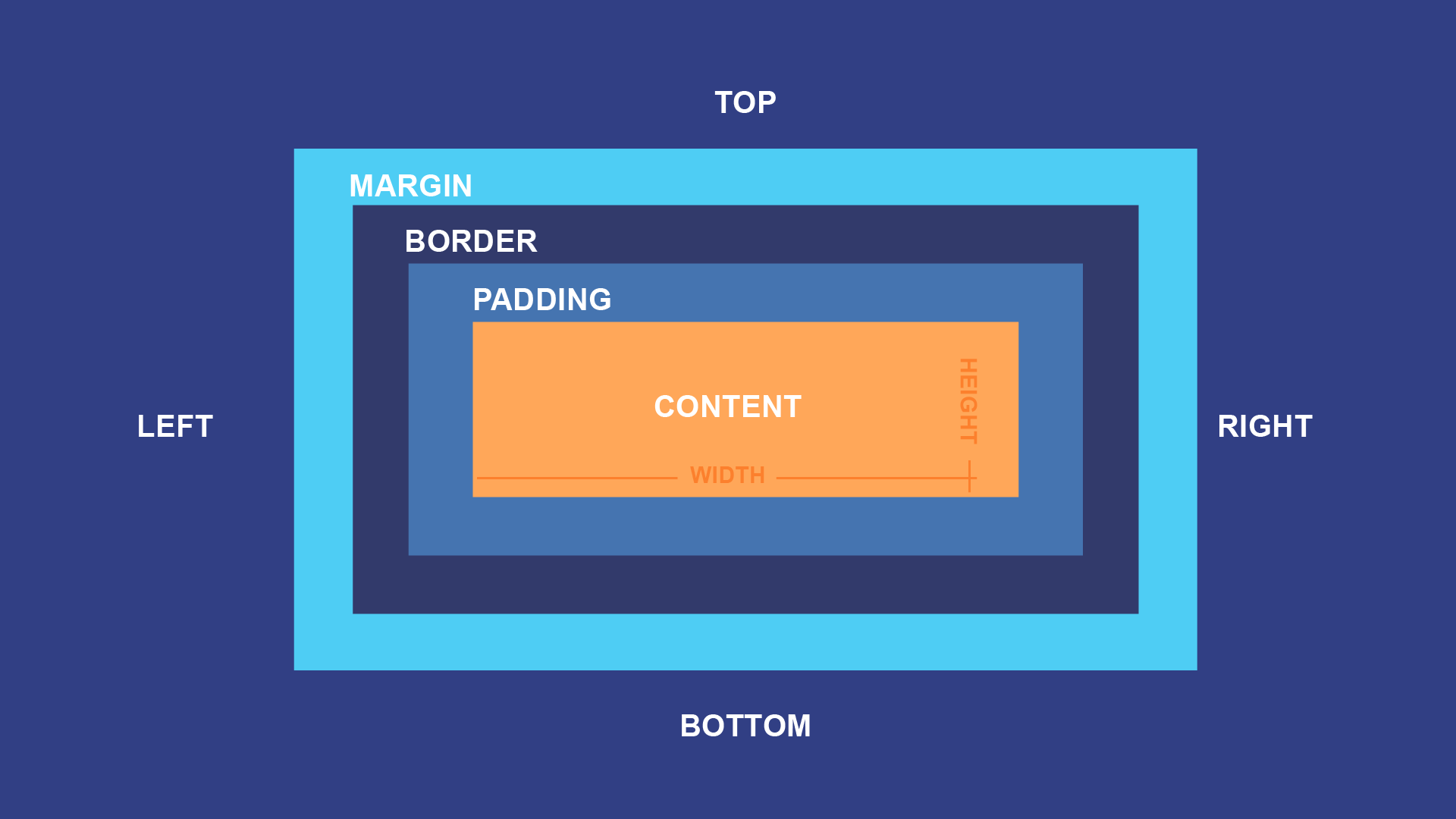
CSS Box Model Basics
The total size of an element consists of:
-
Content: The actual content area (e.g., text, images).
-
Padding: Space between the content and the border.
-
Border: The thickness of the border.
-
Margin: Space outside the border.
-
box-sizing:content-box: Total size = content + padding + border + margin. (default) -
box-sizing:border-box: Total size = content (include border, padding) + margin, (Independent of border and padding)
Quick Revision ⚡
Properties Grouping
property-side-attribute- Properties:
- only have attribute :
background, - only have side :
margin,padding - have both side and attribute:
border
- only have attribute :
- Attribute:
color,style,opacity - Sides:
top,right,bottom,left
Units in CSS
- Fixed Layouts: Use absolute units like
px,cm. - Responsive Designs: Use relative units like
%,em,rem,vw,vh. - Typography: Prefer
emorremfor scaling fonts consistently.